ServiceNow · AI-native design
From blank slate to guided setup
What it takes to hand a commercial admin, working alone, a confident path through one of the deepest configuration surfaces in enterprise software.
Role
UX content and navigation IA, Senior Content Designer, Core IT
Scope
ITSM, Core Business Suite, CSM, Implementation Agent, Installation hub
Team
Cross-BU UX, Product Management, engineering
Outcome
Production-ready ITSM instance in under 30 days
The context
ServiceNow’s historical sweet spot has been complex enterprise organizations: places with admin teams, expert consulting services, and dedicated implementation support. This initiative targeted a different audience: commercial admins, from organizations of roughly 1,000 to 5,000 employees, who typically have none of that. No supporting team, no consultants, no enterprise-grade safety net.
Yet they inherit the same platform, with its enormous configuration surface area (service catalogs, SLAs, incident workflows, knowledge bases, user roles) and no built-in sense of sequence or priority. The existing tooling assumed you already knew what “done” looked like, an assumption a commercial admin working alone can’t afford. This work explored what it would take to change that assumption, and ended in a cross-BU implementation framework with a concrete goal: a deployed production instance, ready to handle employee, platform, and IT service management, in under 30 days.
Act 1:It’s deep. It’s wide.
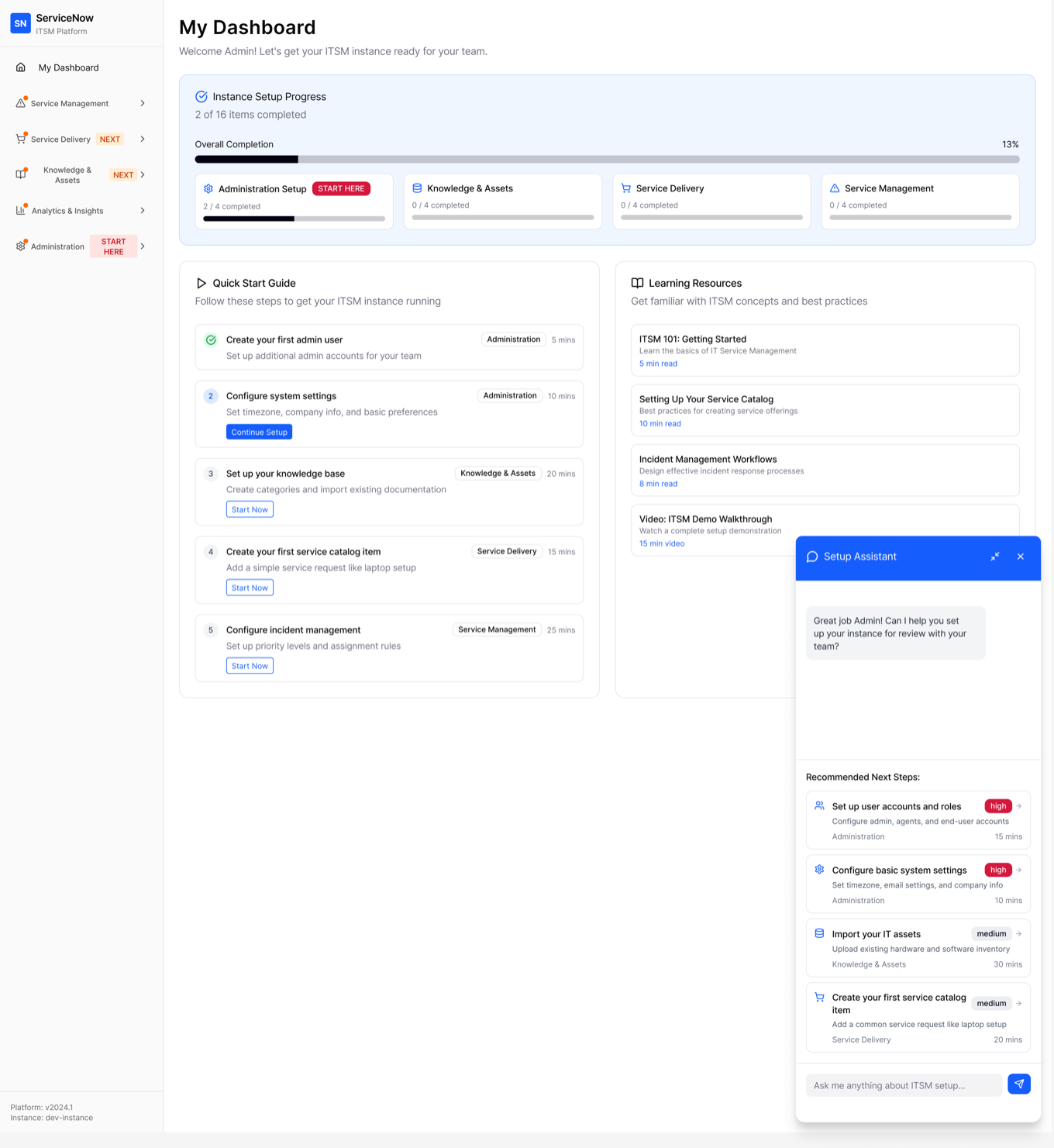
For someone new to ITSM concepts entirely, the platform’s configuration surface isn’t a learning curve. It’s a cliff. This exploration asked: what if the platform told you where to start, tracked what you’d done, and stayed present as you worked through it, rather than leaving that to documentation, tribal knowledge, or a consultant?
The design centers on three things working together:
- A visual progress model. Setup is presented as four modules (Administration, Knowledge & Assets, Service Delivery, Service Management) with real completion state, so “how much is left” is never a mystery.
- Ranked next actions. Instead of a flat checklist, tasks are ordered and time-boxed (“Configure system settings: 10 mins”), so the admin always has a single next step, not a wall of options.
- A contextual assistant. Surfaced alongside the setup flow, it offers recommended next steps and answers ITSM-specific questions in place, rather than sending the admin off to search documentation separately.
The bet: reducing decision fatigue (what should I do next, and why) matters as much as reducing step count. A new admin doesn’t need fewer things to configure. ITSM is inherently broad. They need a confident, sequenced path through it.
Act 2:How to build an SLA
SLA management is a genuinely deep domain. Response versus resolution targets, business-hours calculations, escalation chains, and routing logic can occupy an entire ITSM certification track. Rather than becoming a domain expert first, this exploration treated “ideal-state SLA configuration” as a design question: strip away tribal knowledge and ask what the minimum viable shape of this task looks like on a fresh slate.
That outsider’s position wasn’t a limitation to work around. It put the designer in the same seat as the audience: someone who needs the tool to make the domain legible, not assume fluency. The status quo made the dependence on subject-matter experts painfully clear. Existing screens were hard to grok, required extensive information-gathering, and setup typically happened through side-by-side walkthroughs with SMEs, with any number of potential blockers depending on which rabbit hole you fell into. The standard scoping tool, a PRD, was itself a sore subject: incomplete, poorly defined, or as intimidating as the task it was meant to frame.
The concept: reduce the starting point to the most basic facts and requirements, and let an assistant carry the person from “I don’t know where to begin” to a savable first draft.
Breaking down the complexity
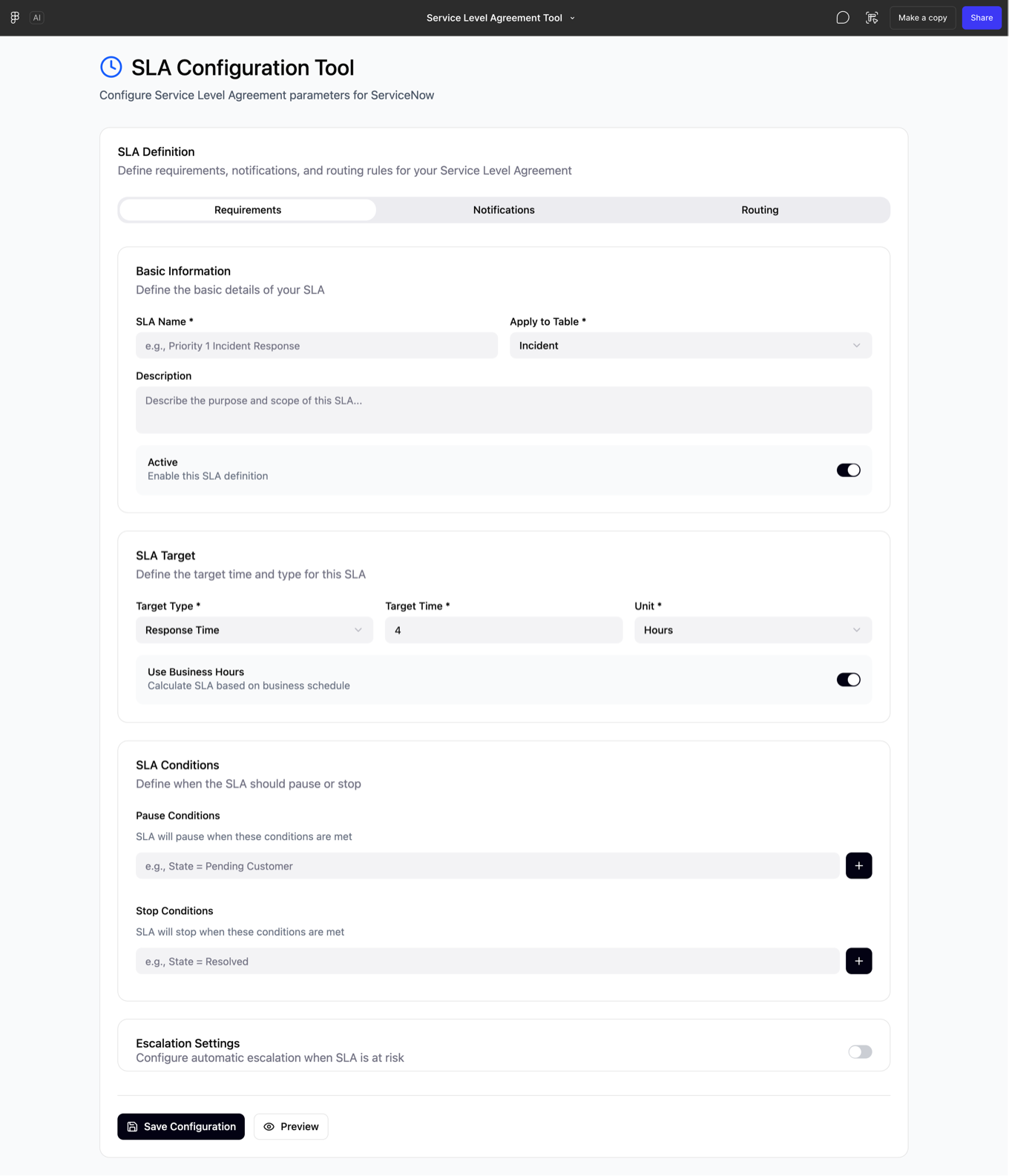
Requirements narrows SLA setup to what’s actually required to save a draft: basic info (name, target table, description), a single target (type, time, unit, business-hours toggle), pause/stop conditions, and an escalation toggle. A Preview surfaces what’s still missing before you continue, rather than a submit-and-fail pattern.
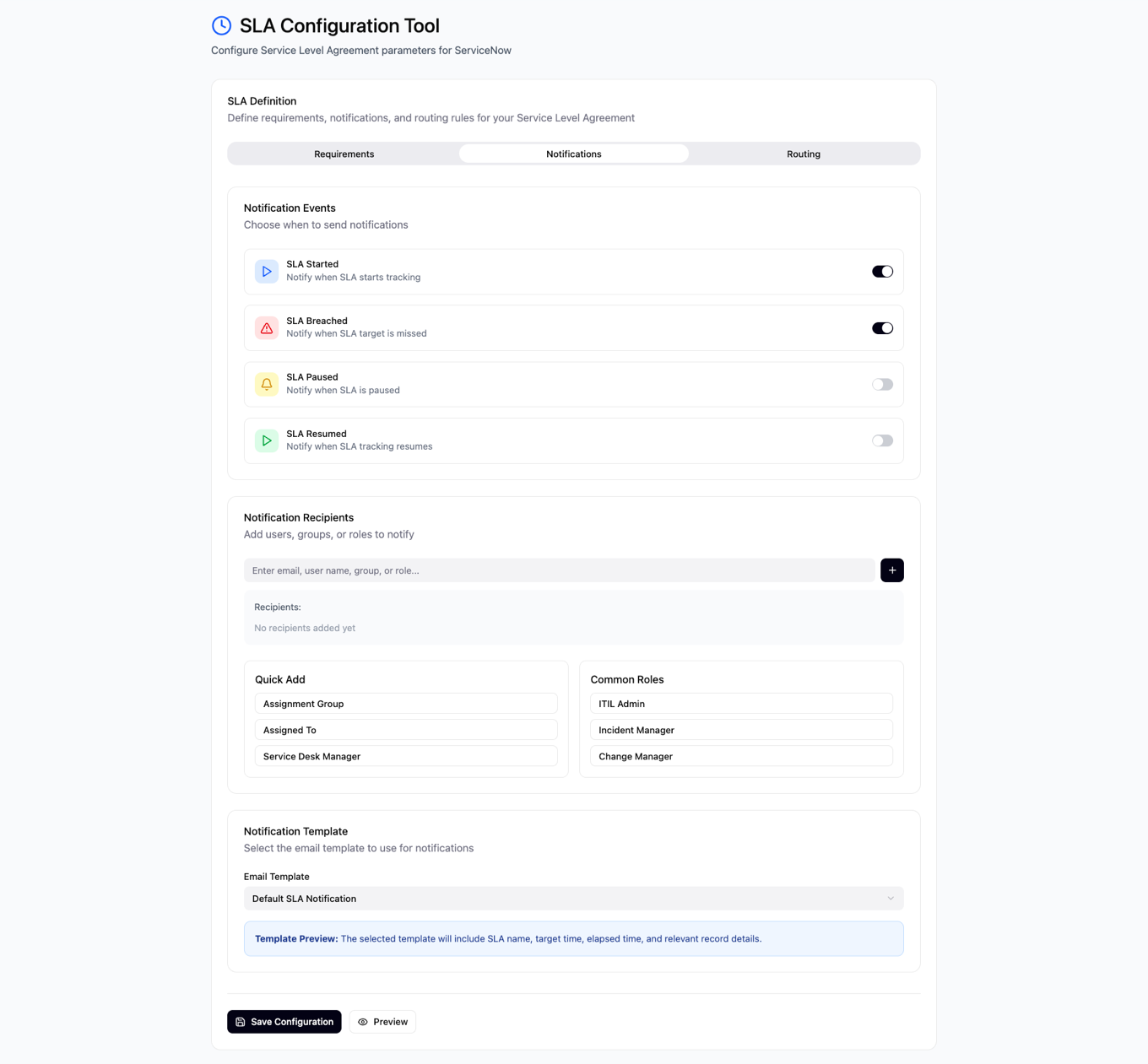
Notifications removes recall burden entirely. Instead of typing exact role names, common ITSM roles (ITIL Admin, Incident Manager, Change Manager) are one click away. A plain-language template preview tells you what the notification will contain before you commit. Event defaults are opinionated: SLA Started and SLA Breached ship enabled; Paused and Resumed are opt-in. Breach and start are treated as the moments a new admin truly needs, and the rest as noise until proven otherwise.
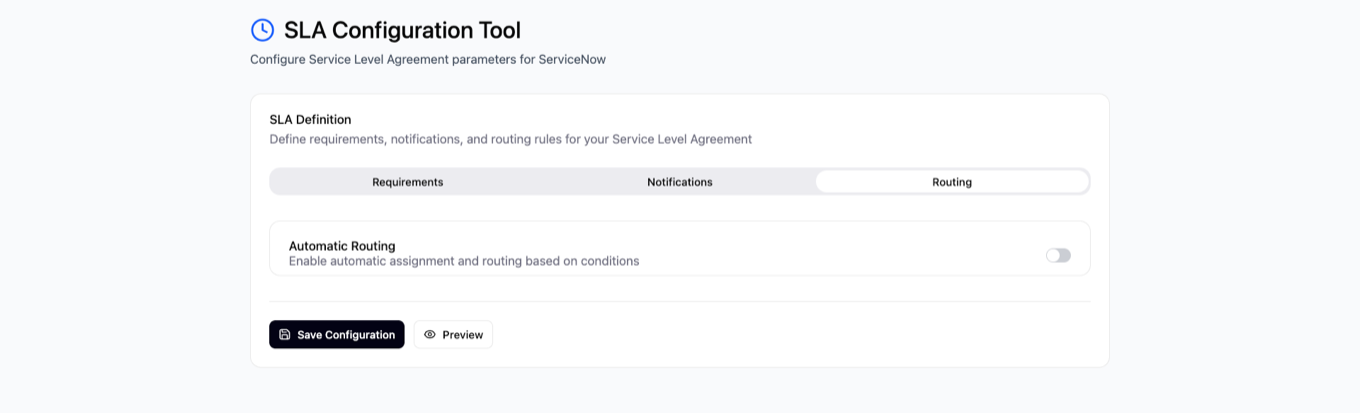
Routing is a single toggle (“enable automatic assignment and routing based on conditions”) with the underlying logic left unbuilt. This wasn’t a strategic scoping decision so much as an honest reflection of the problem itself. Routing was where the existing screens offered the least direction and where SME dependence ran deepest. The exploration’s thinnest section maps exactly to where the organizational knowledge gap was widest. It names the need and stops.
Act 3:Time to value
The concepts from the earlier explorations converged in a preliminary core ITSM implementation framework, built by UX teams across multiple business units and intended for user testing with a select group of partners to inform future updates. This wasn’t a solo artifact anymore. It was a coordinated, production-grade experience with a hard target: a deployed production instance, ready to handle employee, platform, and IT service management, in under 30 days.
The shipped flow
Admin Home greets the admin by name and introduces the Implementation Agent as the starting point for installing, configuring, and granting access to products. The ITSM landing page opens with a plain-language fork (“Welcome! Let’s get started”) that routes first-time setups one way and instance migrations another, so admins self-select a path instead of decoding one. Installation progress is narrated in two steps with honest, human status copy (“Installing… This may take a bit”), and the “While you wait” panel converts dead time into orientation, pointing admins toward how Now Assist implementation agents can help configure installed apps.
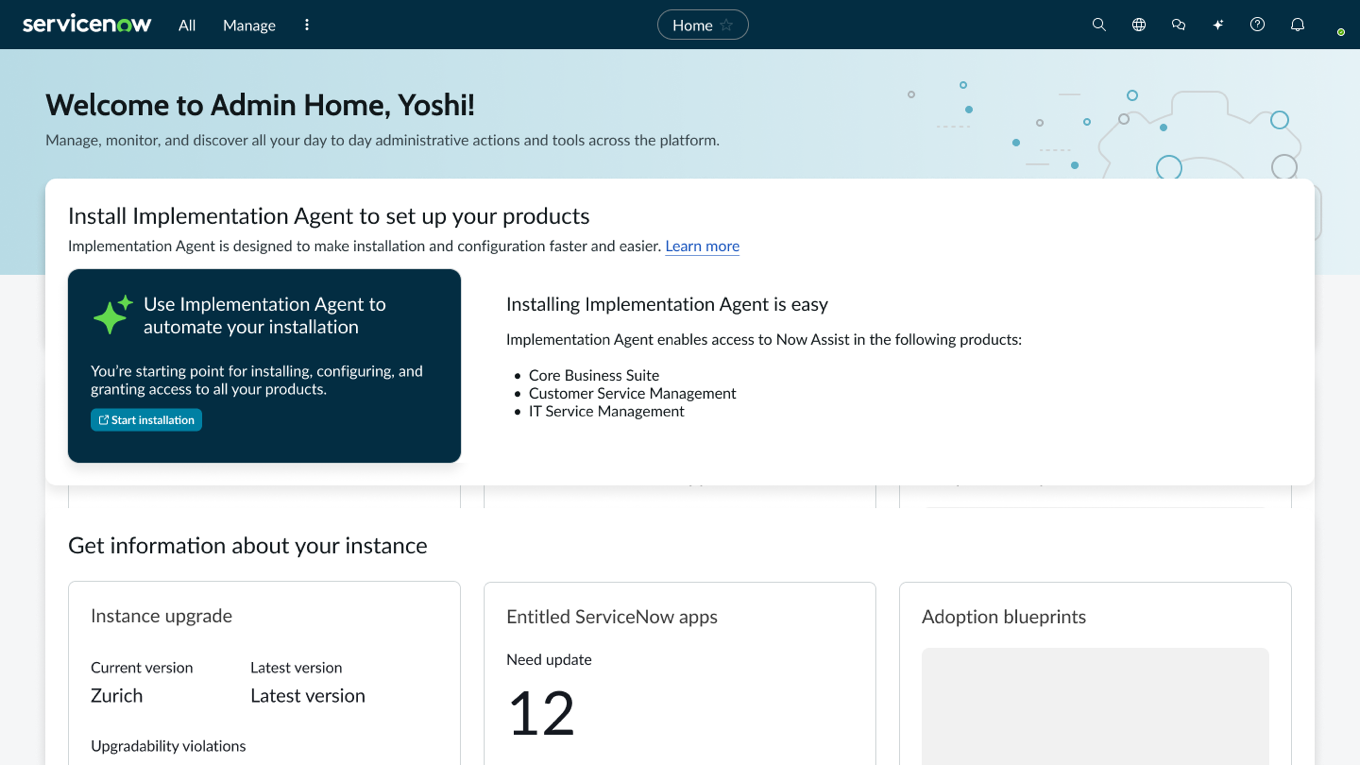
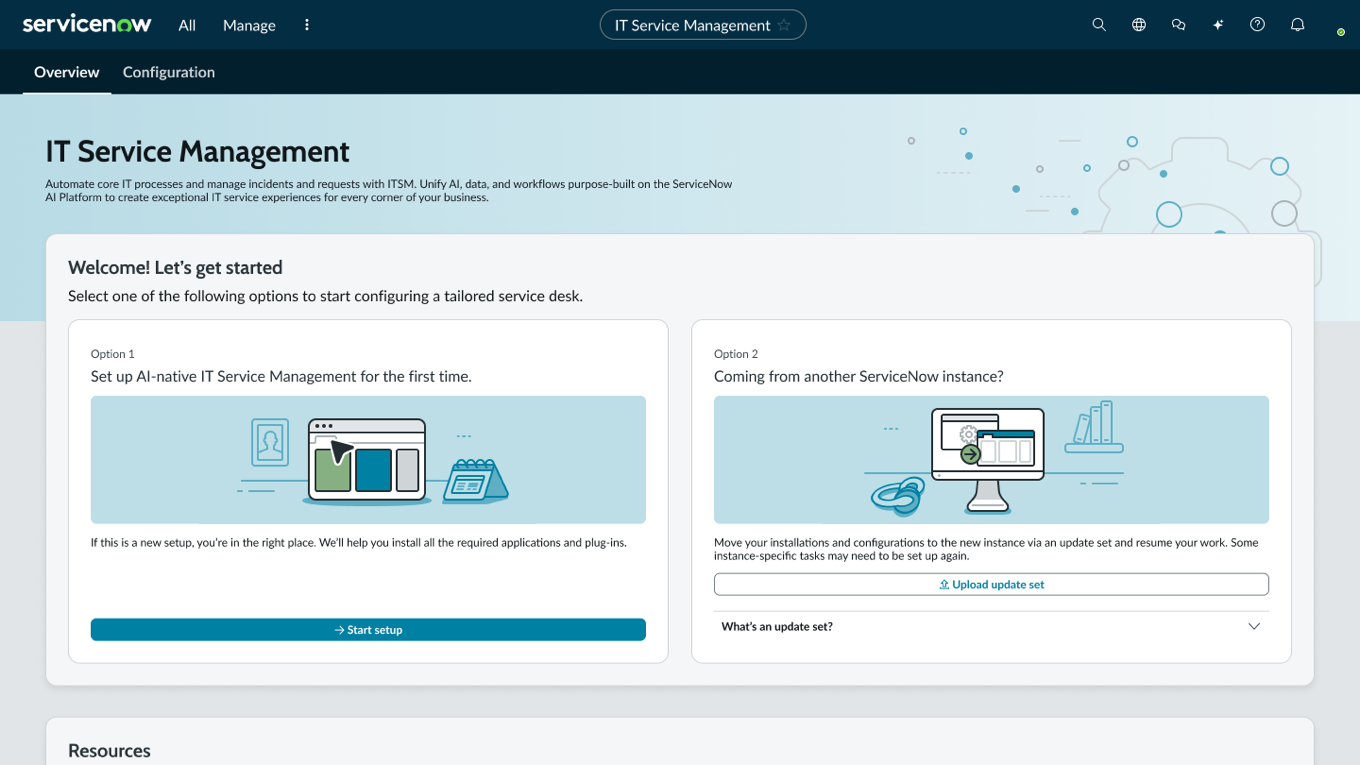
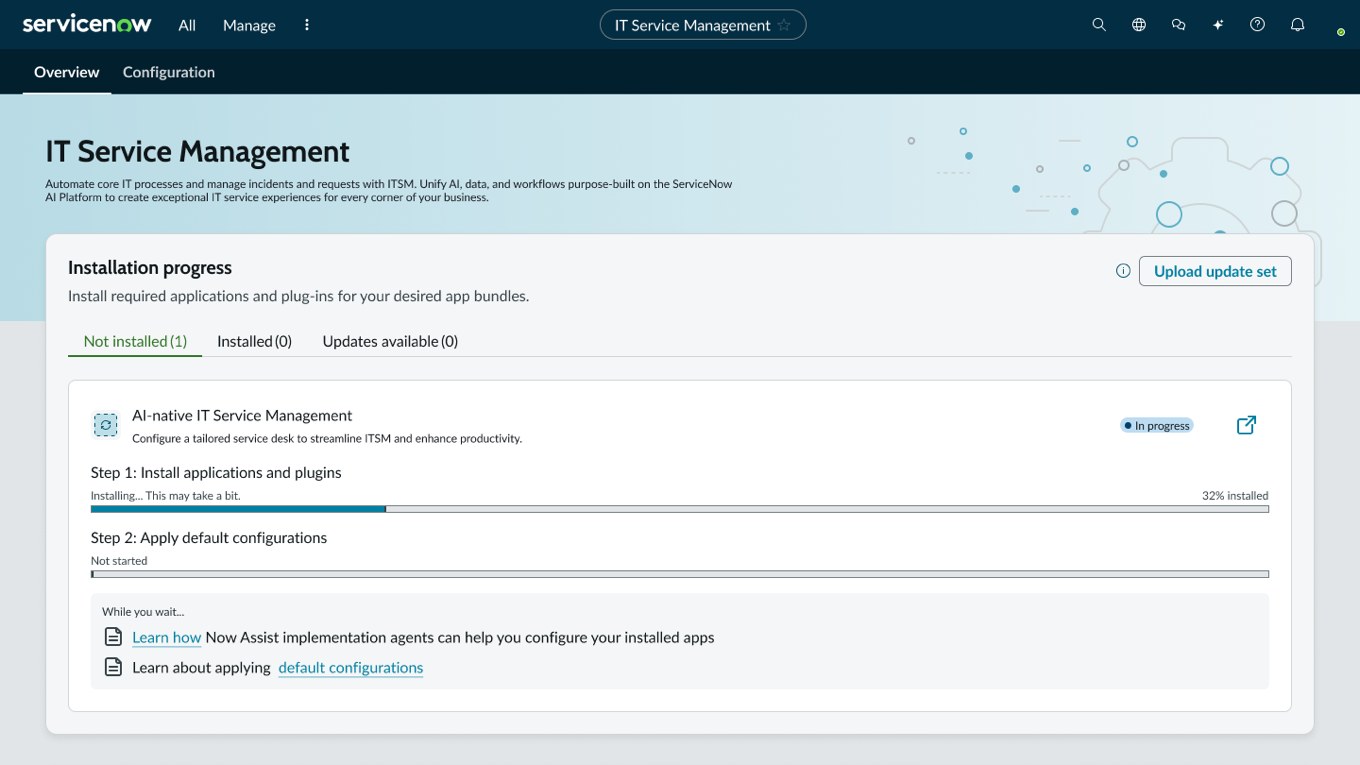
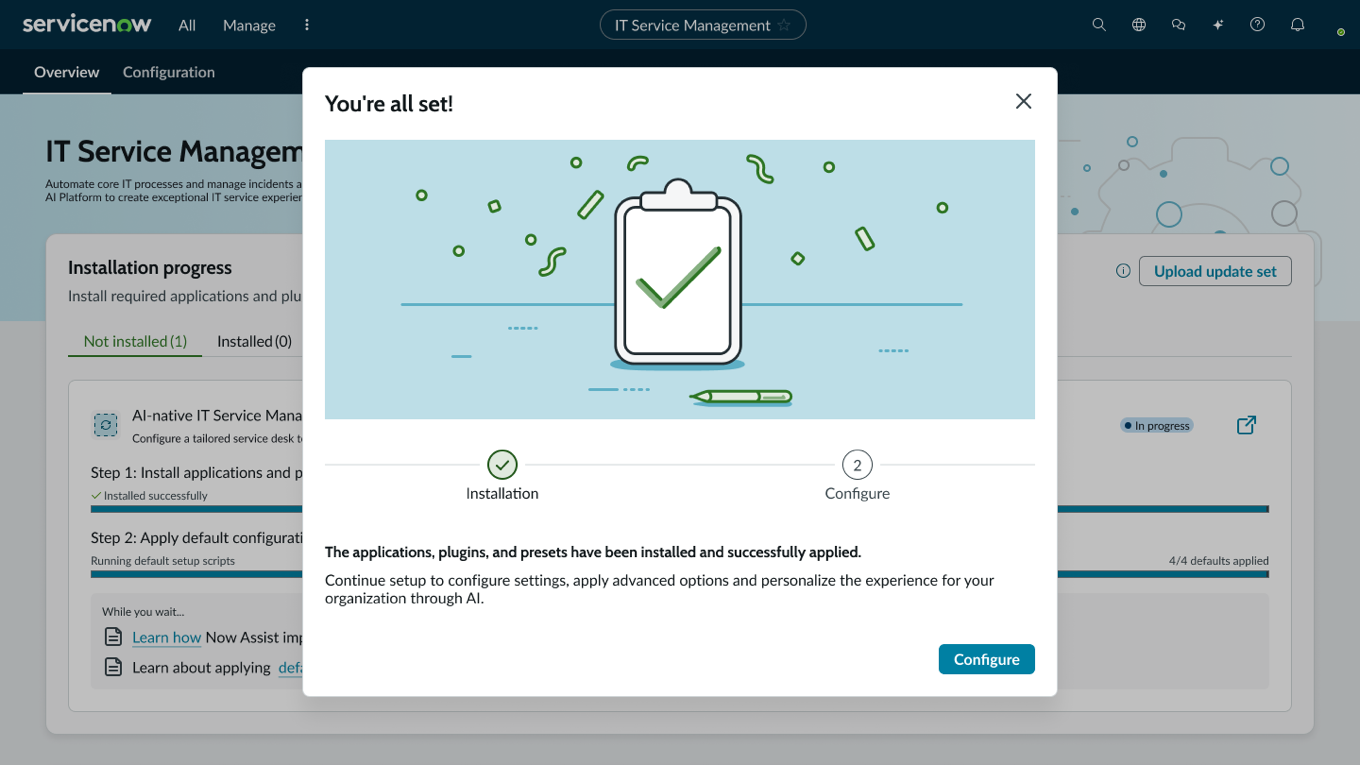
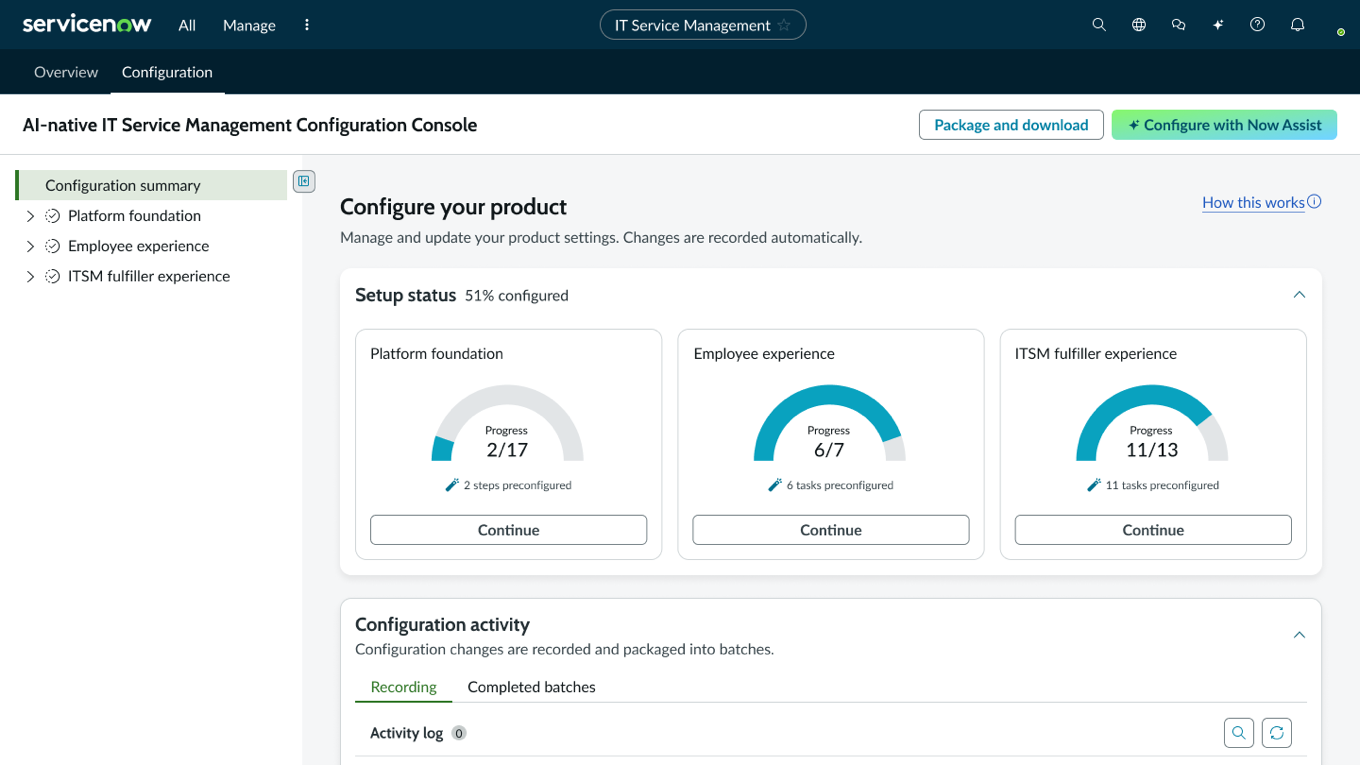
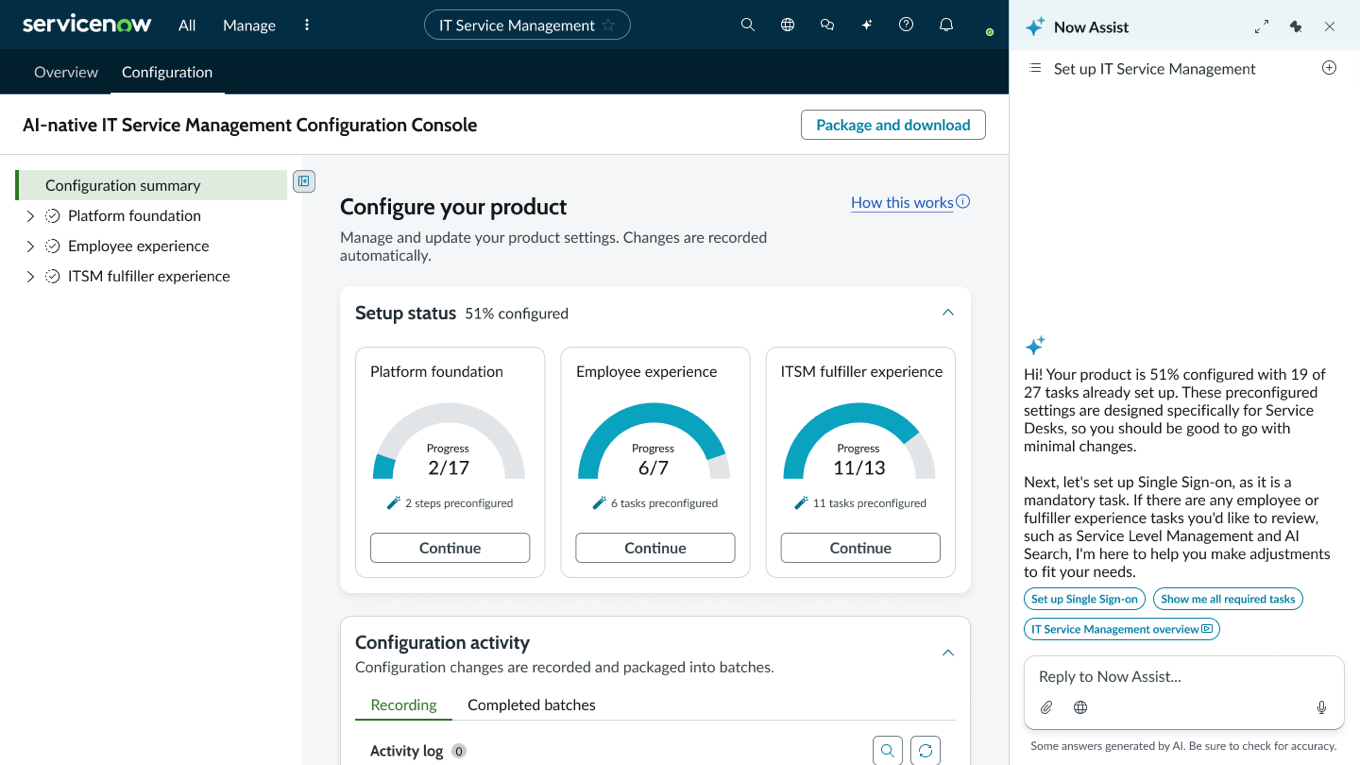
The Configuration Console is where the earlier bets land visibly. Setup status is chunked into three domains (Platform foundation, Employee experience, ITSM fulfiller experience) with progress gauges and preconfigured-task counts, echoing the exploration’s module-based progress model. And Configure with Now Assist, new in this framework, makes the assistant a first-class configuration path: it opens knowing the state of your instance, names the next mandatory task, and offers one-tap next steps. The framework deliberately retained manual configuration paths for admins already fluent in the space; the assistant is an on-ramp, not a cage.
My contribution: UX content across the framework
The interface design belongs to the UX teams across the contributing business units. My role was UX content: I drafted or reviewed all content presented by UX across ITSM, Core Business Suite, Customer Service Management, the Implementation Agent, and the Installation hub, fielding requests from UX leadership, Product Management, and the responsible designers depending on the design and interaction. Weekly share-outs across the simultaneously moving teams kept that possible: each week surfaced newly available resources alongside problems not yet solved, which is what allowed content decisions in one product area to stay consistent with what was emerging in the others.
The work took three forms:
- Enforcing existing patterns. Where established conventions applied, I applied them: spelling out common acronyms on first reference (SSO in the Now Assist setup panel, for example) and aligning the language describing and interacting with update sets to an existing framework, so new surfaces stayed consistent with the structures admins already knew.
- Creating or adopting new patterns. New capabilities needed new language. The Implementation Agent and the introduction of Configure with Now Assist required naming, framing, and interaction copy that didn’t exist yet, developed in collaboration with the teams building them.
- Working within emerging AI standards. Rules governing affordances announcing where generated content appeared were set by the AI team as part of an evolving standards effort. My job was to apply those rules consistently across the surfaces I touched, not to author them.
My contribution: navigation information architecture
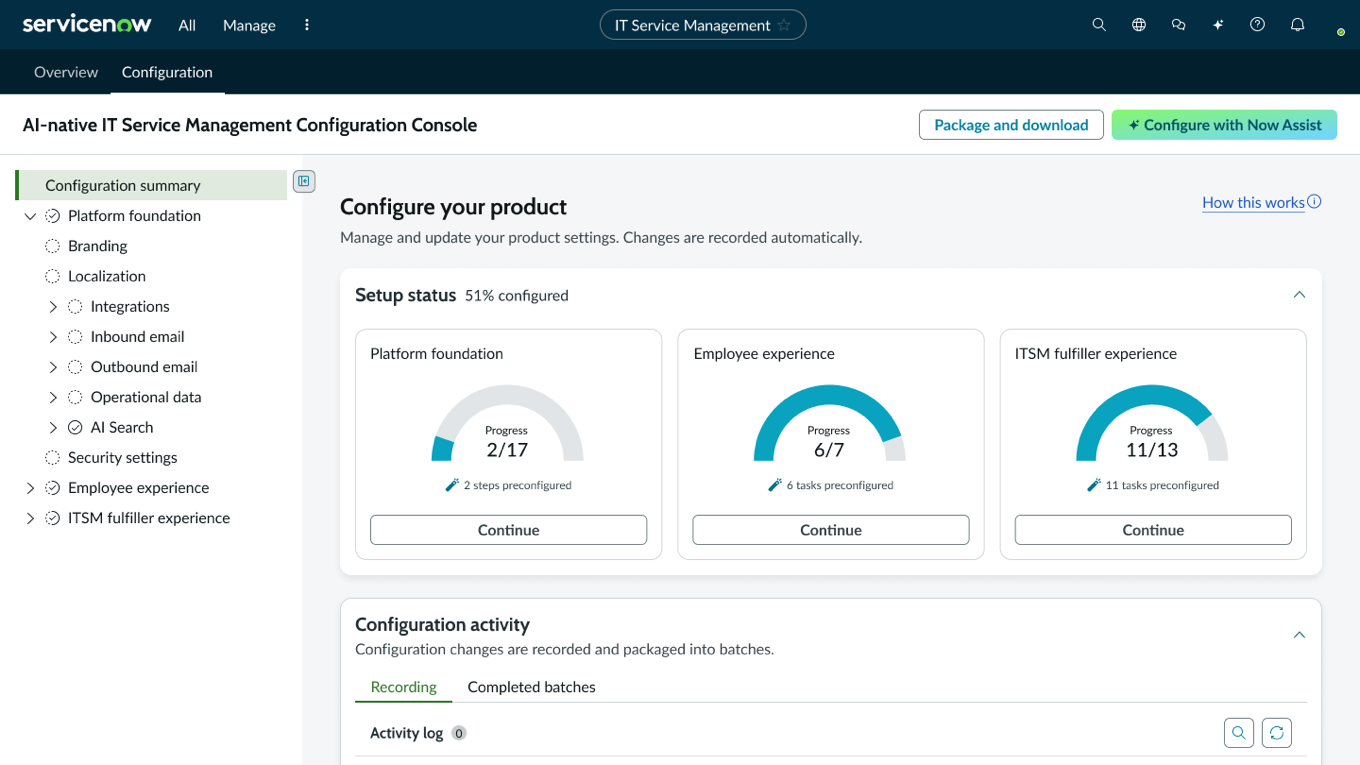
Beyond content, I was consulted repeatedly on the navigation IA. Initial direction came from Product Managers and Product Leadership; I worked with them to simplify, and where possible to group the content trees (built on a component that was itself being developed simultaneously) into logical segments, then worked with engineering to order those segments in the sequence needed to reach the desired outcome: that production-ready instance in under 30 days.
PostScript
The “assistant helps you get started” concept arrived independently twice: once in a blue-sky admin dashboard, once in a narrow SLA configuration exploration built by someone deliberately working without domain expertise. By the time the implementation framework shipped for partner testing, that concept was no longer an idea in a Figma file. It was the organizing principle: assistant-guided setup as the default starting point, with manual paths preserved for experts, in service of one measurable promise: production-ready in under 30 days.
Early signals backed the promise. The initial goal of ITSM Foundation deployed in less than 30 days proved not only doable: with the help of a partner, it can even be cut in half.
Working on a moonshot?
Fast-moving teams, colliding agendas?